Printers Showing Offline with Print Server

Written by

in

Quick one here which I thought was notable:

I had an issue where printer queues on Windows Server 2012 were showing as Offline. They worked perfectly fine though. I could ping the printers, so it wasn’t that SMNP was being blocked.

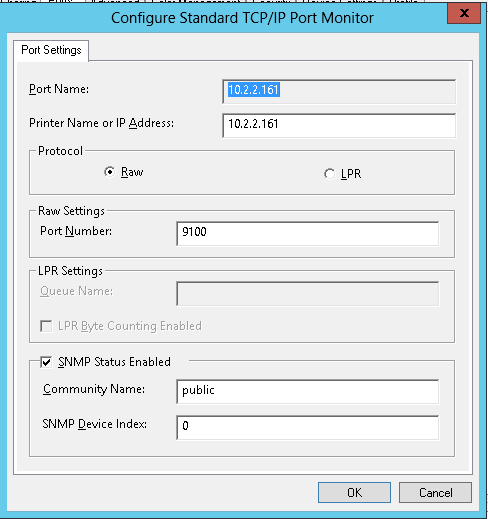
The strange fix was to go into the Printer Properties > Ports tab > Configure Port button. From there, I had to tick the option ‘SNMP Status Enabled’ and press OK (it was off by default). That didn’t fix it, but going back in and turning that option off again and pressing OK, fixed it. The printer I tested this on came online. After doing it to several more printers, each one changed it’s queue status to “Ready”.

SNMP Status Disabled:printer
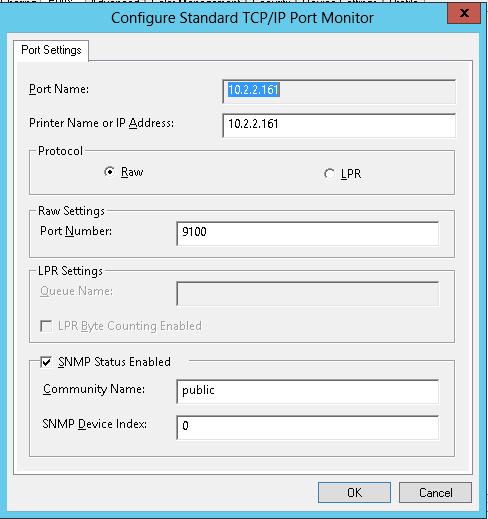
SNMP Status Enabled:printer

SNMP Status Disabled again:printer

I have no idea why this was needed, or why it worked – but it did, and was reproducible many times. If you run into this problem, it might be the quick fix you need.

queue

It’s more advanced than turning off and on again, as there was the extra step at the start of turning on :)

Conspiracy theories as to the real reason for this are welcome in the comments


Comments

14 responses to “Printers Showing Offline with Print Server”

  1. grazer

    I am experiencing this issue on a brand new 2012R2 server running Printer Server and DC roles. Solid fixes are hard to find, but this workaround worked for me on a couple of machines.

    Remove the printer queue with \\servername\queuename from the client and replace it with \\serverip\queuename

    I had two particularly troublesome clients – luckily (but strangely) not the whole office.

    Thanks for your post.

    1. Adam Fowler

      Thanks for sharing that it worked, and glad it wasn’t just me :)

  2. Rafael

    It turns out that Windows automatically enables SNMP support for networked printers, and if it can’t get a response to a SNMP message then it assumes the printer is offline.

    Source: http://blog.rtwilson.com/how-to-fix-a-network-printer-suddenly-showing-as-offline-in-windows-vista/

  3. Buck

    Thank you! This just worked for a client who’s site-to-site vpn broke. Once the VPN was back up the printer wouldn’t go online. This did it.

  4. Worked for me, thanks

  5. Thanks for sharing very helpful for me

  6. joe

    Thank you, I unchecked the box and it worked immediately!

  7. nS

    its works for me as well

  8. Hello admin! May I know the exact steps of how to to solve hp printer not printing black issue as I have Hp Printer and I am unable to solve hp printer offline issue . Can someone help me to with this?
    https://sites.google.com/view/informative-blogs

  9. Doug

    Weird…that was it, don’t understand why, but don’t care it worked. Thanks

  10. Nick Thompson

    Worked for me, thanks

  11. Sam

    thanks! works as time of posting

  12. Charlie

    Hello, August 2023 here and your solution worked. Thank you, Thank you, Thank you.
    Let’s see now, this would make it my 55th time today telling everyone in my department (IT, I’m a Linux Admin) how much I dislike Microsoft, keeps me employed I guess.

    Anyhow, your solution worked. Thanks much!

  13. Looking for instant printer help? PrinterHelp247 offers 24/7 support for all your printer needs, anytime, anywhere.
    123 hp setup

Leave a Reply

This site uses Akismet to reduce spam. Learn how your comment data is processed.

Discover more from AdamFowlerIT.com

Subscribe now to keep reading and get access to the full archive.

Continue reading