This page can’t be displayed
Turn on TLS 1.0, TLS 1.1, and TLS 1.2 in Advanced settings and try connecting to https://yoursite.com again. If this error persists, it is possible that this site uses an unsupported protocol. Please contact the site administrator.
This is the error that started turning up on a particular site in the last few days, for Internet Explorer 11.
Microsoft Edge showed a different page, making it sound like the site wasn’t resolving to DNS queries at all, or that I was offline:
The workaround I’ve found for the moment in my particular scenario, was to enable the ‘Use SSL 3.0’ option under Internet Explorer’s Advanced options:
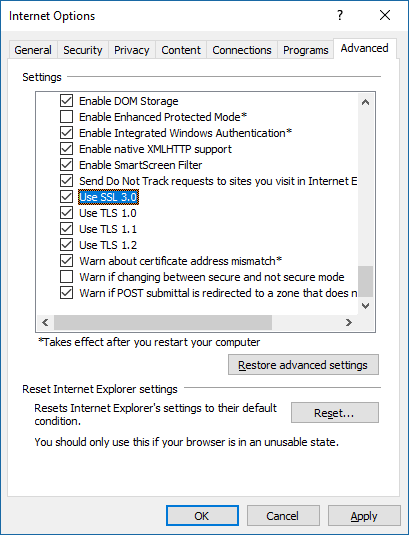
Worth doing for testing, but do not leave this ticked if possible. This is not best security practice, but may be the only way you can access a particular site.
Edge as far as I can tell, can’t be changed to support a site like this.
I have a suspicion that a Windows Update in the last week or two has just toggled this tickbox, so you may need to put it back. It’s an older type of encryption which the POODLE exploit was centred around, so the sever hosting this cert should be updated as soon as possible.
Update after more testing:
This is due to “Update to add new cipher suites to Internet Explorer and Microsoft Edge in Windows”
Windows 10 Anniversary Update included patches that blocked SSL 3 support by default.
Windows 7 SP1, Windows 8.1 etc were patched back in June 2016 – KB3161639
That June patch has been superseeded by a July 2016 patch KB3172614
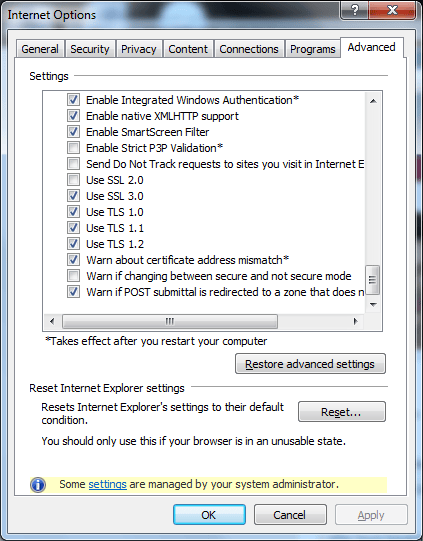
This is what the Advanced Internet Options in Internet Explorer look like before the update (not the Use SSL 2.0 option, and Use SSL 3.0 is ticked):
Leave a Reply